How Metacto Built One Knowledge Layer for Every AI Tool
We connected our business systems into one company knowledge layer. ChatGPT, Claude and our own AI tools all reach it through MCP, and every employee sees only what they're authorized to see. Here's how it works and why we built it this way.

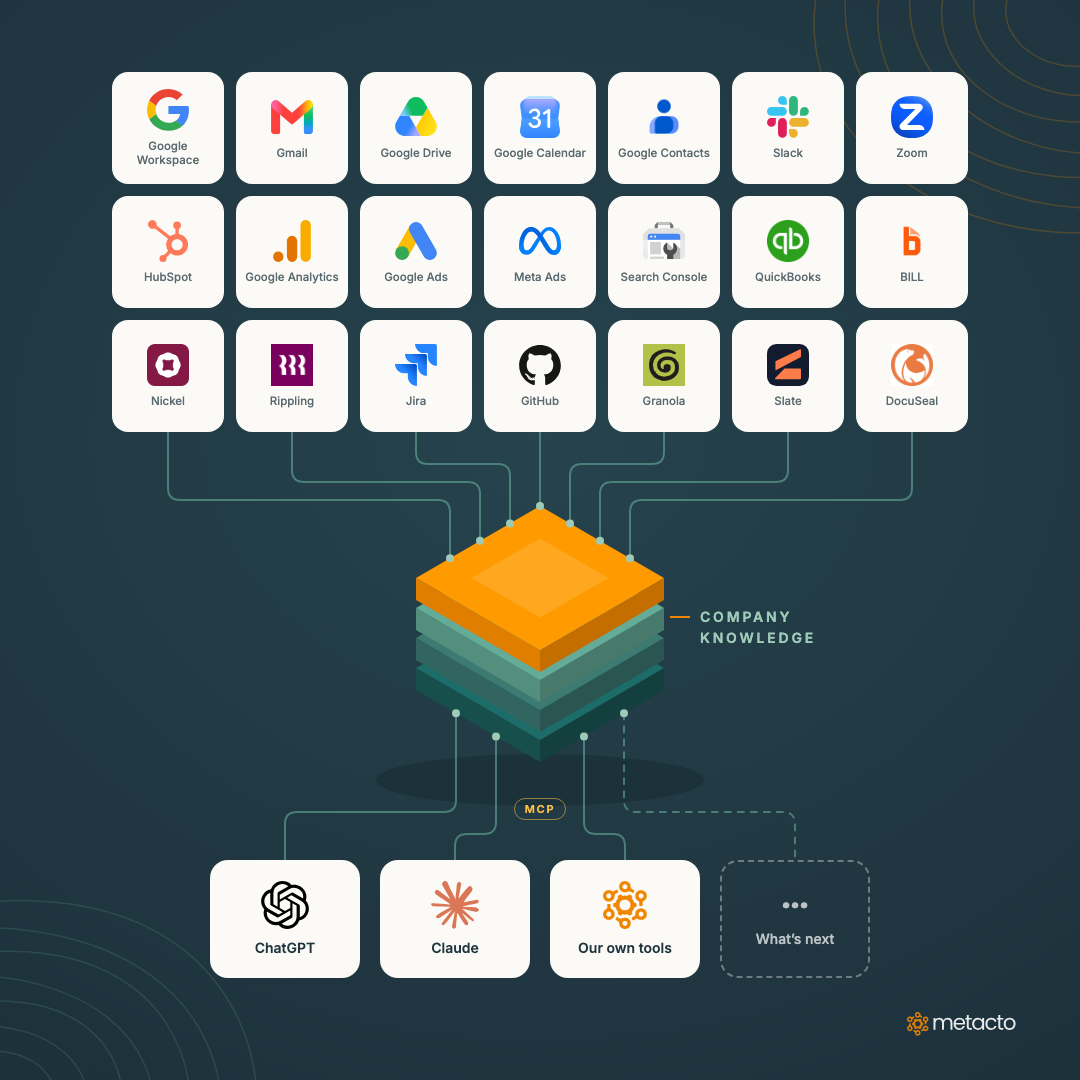
Google Workspace, Gmail, Google Drive, Google Calendar, Google Contacts, Slack, HubSpot, QuickBooks, BILL, Nickel, Jira, GitHub, Zoom, Granola, Slate, DocuSeal, Google Analytics, Google Ads, Meta Ads and Google Search Console.
We’ve connected all of these into one company knowledge layer at Metacto. ChatGPT, Claude and our own AI tools reach it through MCP (Model Context Protocol), the open standard for connecting AI tools to outside systems. Every employee gets access to the company context they’re authorized to see, and nothing else. Rippling is next; the connector is built and waiting on API access.
The short version
Our integrations live in one layer we own. The AI tools on top of it can change as often as the market does, and each new one gets the same context, security and permissions on day one.
What we use it for
We use it every day to generate client account updates, review project delivery, investigate invoices, analyze financial performance, prepare for meetings, and answer questions that used to mean jumping between half a dozen systems.
Take “where are we with this client?” That used to mean checking HubSpot, searching the inbox, finding the last call recording, looking at open Jira tickets, and checking whether the last invoice was paid. Now it’s one question, and the answer points back to the CRM record, email thread, transcript and invoice it came from.
Finance works the same way. Earlier this month we asked ChatGPT for Metacto’s September P&L. It called the QuickBooks report tool through the gateway and returned the live accrual-basis report. Nobody exported a spreadsheet.
How it works
There are four pieces.
Read-only connectors. Each source syncs on a schedule into a managed index inside Metacto’s own AWS account. Most sources refresh every 15 minutes and the rest hourly. The finance connectors use fixed read endpoints, so they can’t pay a bill, move money or edit a record.
Two kinds of tools. Search answers questions about what was said: email, documents, call transcripts, Slack threads. Typed queries answer questions about how many and how much: CRM records, invoices, P&L reports, ad and analytics reports. Those return exact records with explicit date ranges and complete pagination. Search ranks the best matches, which is right for finding a transcript and wrong for totaling invoices, so numbers get their own tools.
One gateway. Every AI tool connects to the same MCP endpoint. Each person signs in with their Metacto Google account, and the gateway takes their identity from that verified sign-in. A tool call can’t claim to be someone else.
An audit trail. Every request is logged with the user, the operation, the status and how long it took. The log leaves out query text and retrieved content, so the audit trail doesn’t turn into another copy of company data.
Permissions follow the source
The rule we started from: if you can’t open it yourself, your AI tools can’t open it for you. Where a source has its own sharing model, we mirror it. Where it doesn’t, access is granted explicitly by team.
Who can read what
Roles are checked on every request, so a change in someone's access takes effect right away. Disabled accounts can't retrieve anything.
Source: Gmail, Calendar, Contacts
- Who can read it
- The owner of the mailbox, calendar or contact list.
- Notes
- A shared email thread stays with each mailbox owner, even when a colleague was copied.
Source: Google Drive
- Who can read it
- Whoever Drive already allows.
- Notes
- Drive's own sharing permissions are checked on every retrieval.
Source: Slack
- Who can read it
- Members of the channel.
- Notes
- Direct messages are excluded.
Source: Zoom and Granola
- Who can read it
- The meeting host or the note owner.
- Notes
- Private Granola notes are never synced.
Source: QuickBooks, BILL, Nickel
- Who can read it
- People with explicit finance access.
- Notes
- QuickBooks and Nickel also require enforced two-step verification. Banking and payment-method details are excluded.
Source: HubSpot, Jira, GitHub, DocuSeal, Slate
- Who can read it
- Teams with an explicit grant for that source.
- Notes
- Private GitHub repositories are limited to administrators for now.
Source: Google Analytics, Google Ads, Meta Ads, Search Console
- Who can read it
- People with explicit marketing access.
- Notes
- Reports are read-only and can't change a campaign.
It tells the AI what it can’t claim
Every source reports how fresh it is and what it covers. When a sync falls behind or a connector fails, the AI tool sees that before it answers. A search that comes back empty doesn’t count as proof that something doesn’t exist. And “how many open deals do we have?” gets answered by a counted query, never by a search result.
This is what lets people act on the answers. An AI tool that says “the Zoom sync is two days behind” is more useful than one that confidently leaves out Tuesday’s call.
Why the layer is separate from the AI tools
OpenAI introduced Dots. Frontier AI providers ship new models, agents and tools every few weeks. Earlier this month we wrote about running OpenClaw, Hermes, Grok Bot, Muse and Dots on real work. The assistants kept getting better. What made any of them useful at work was access to accurate business information.
Our knowledge layer is independent of the AI tools that use it. We can try a new product, switch providers, or give employees a new capability without rebuilding a single integration. The context, security and permissions stay the same, and the new tool connects to the same gateway.
Nobody knows which models, agents or interfaces will lead two years from now. We do know they’ll all be far more useful with access to current, accurate business information.
Why we're excited about it
The more capable AI becomes, the more valuable our company knowledge infrastructure gets.
What we’d tell a leadership team starting this
- Start where people already jump between systems. The questions that take five tabs to answer today are where the time goes.
- Set permissions per source before anyone asks a question. Mirror the source’s own sharing where you can, and grant the rest explicitly.
- Keep connectors read-only at first. Actions that change records can come later, with a person approving them.
- Give numbers their own tools. Counts, totals and date ranges need exact queries.
- Show freshness. A stale source should say it’s stale.
- Keep the layer in your own cloud account, behind an open standard. That’s what lets it outlast whichever AI tool is popular this year.
We build this for clients too: connected to their systems, with their permissions, inside their own cloud.