

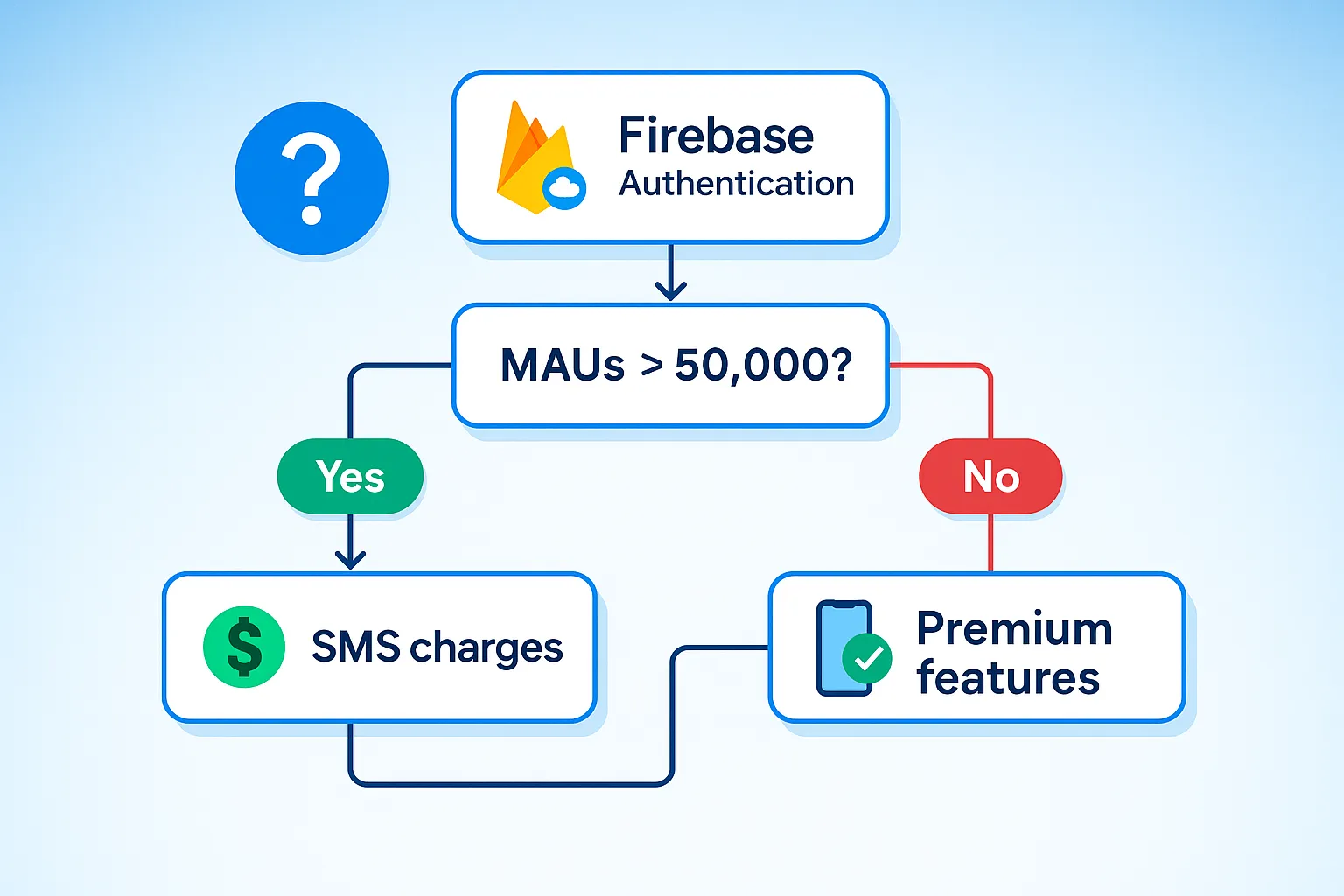
Understanding Firebase Authentication pricing can be confusing. Between the generous free tier, Monthly Active Users (MAUs), and premium features hidden in Google Cloud Identity Platform, it’s hard to know what you’ll actually pay. Whether you’re launching a new app or scaling an existing one, getting your authentication costs right is crucial.
Updated May 2026: This guide reflects the latest Google Cloud Identity Platform pricing tiers, including the new graduated MAU pricing structure ($0.0055-$0.0025 per MAU) and current SMS rates by region. All cost examples and the interactive calculator have been updated.
At metacto, we’ve helped countless startups and established companies navigate these complexities as part of our mobile app development services. This guide provides a clear, up-to-date breakdown of all Firebase Auth costs for 2026. We’ll cover the free tier, how MAUs are calculated, SMS pricing, real-world cost scenarios, and proven strategies to reduce your authentication costs by up to 50%.
TL;DR: Firebase Authentication is free for the first 50,000 Monthly Active Users (MAUs) for basic email/password and social logins. You only pay for Phone Authentication (SMS) or if you exceed 50,000 MAUs, which triggers tiered pricing through Google Cloud Identity Platform.
But what will you actually pay based on your specific app? Use our interactive calculator below to get an instant estimate of your monthly costs. Just adjust the sliders to match your expected user base and authentication method:
Firebase Auth Cost Calculator
Estimate your monthly Firebase Authentication costs based on your usage patterns.
Estimated Monthly Cost
✅ You're within the free tier! (25,000 MAUs remaining)
* This calculator provides estimates. Actual costs may vary. First 10 SMS per day are free for testing.
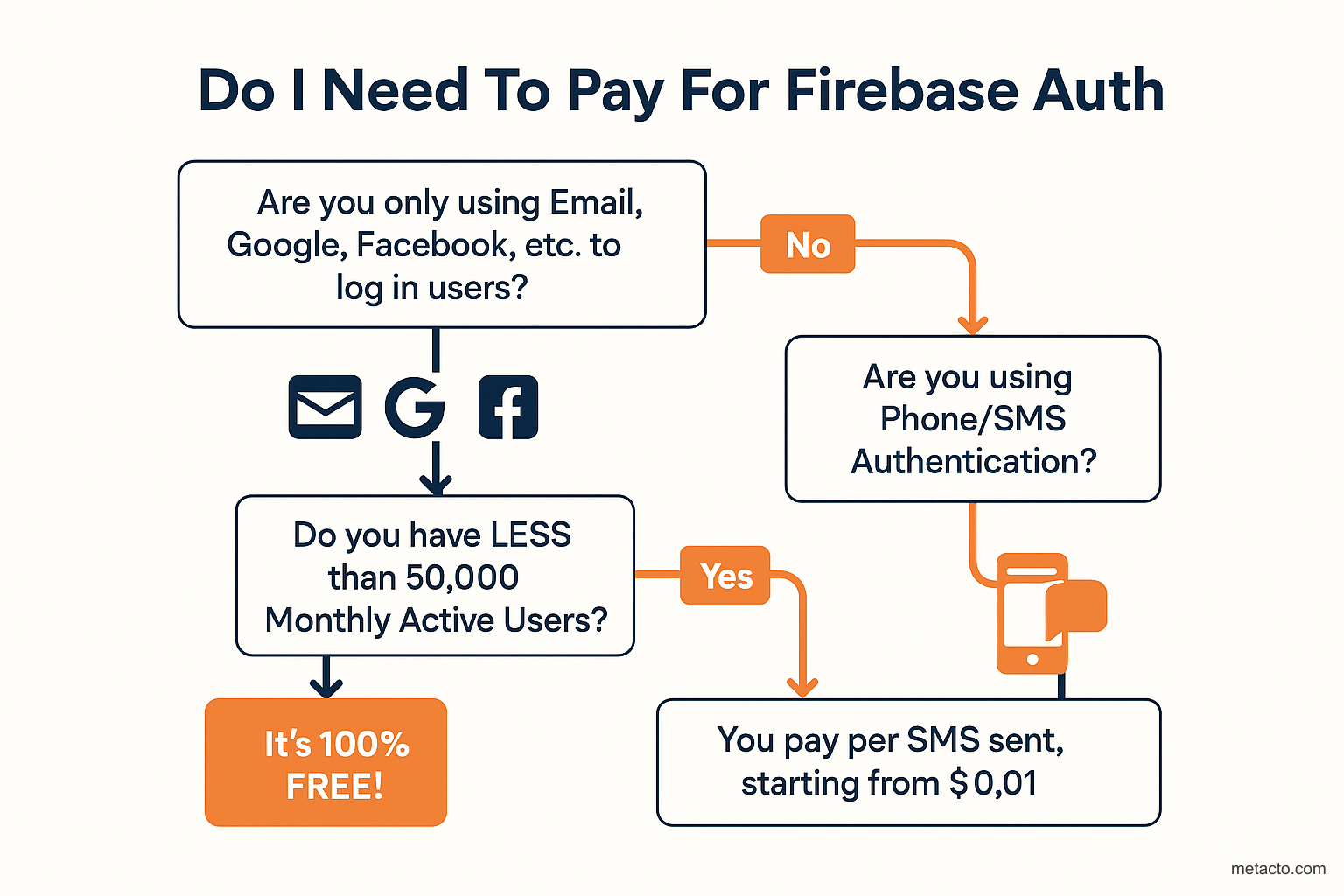
Do I Need To Pay For Firebase Auth Infographic
Designer Instructions
Create a simple, visually engaging flowchart that answers the main question. Use large 'Yes' and 'No' paths with icons. Flow: Start with 'Are you only using Email, Google, Facebook, etc. to log in users?' If Yes: 'Do you have LESS than 50,000 Monthly Active Users?' If Yes: 'It's 100% FREE!' If No: 'You pay per user after 50k.' If original answer is No: 'Are you using Phone/SMS Authentication?' If Yes: 'You pay per SMS sent, starting from $0.01.'
Firebase’s Free Tier vs. Paid Tier (Identity Platform)
Firebase Auth’s pricing is split into two main products: the standard Firebase Authentication service (with its generous free tier) and the more powerful Google Cloud Identity Platform, which you are automatically upgraded to when you exceed the free tier limits.
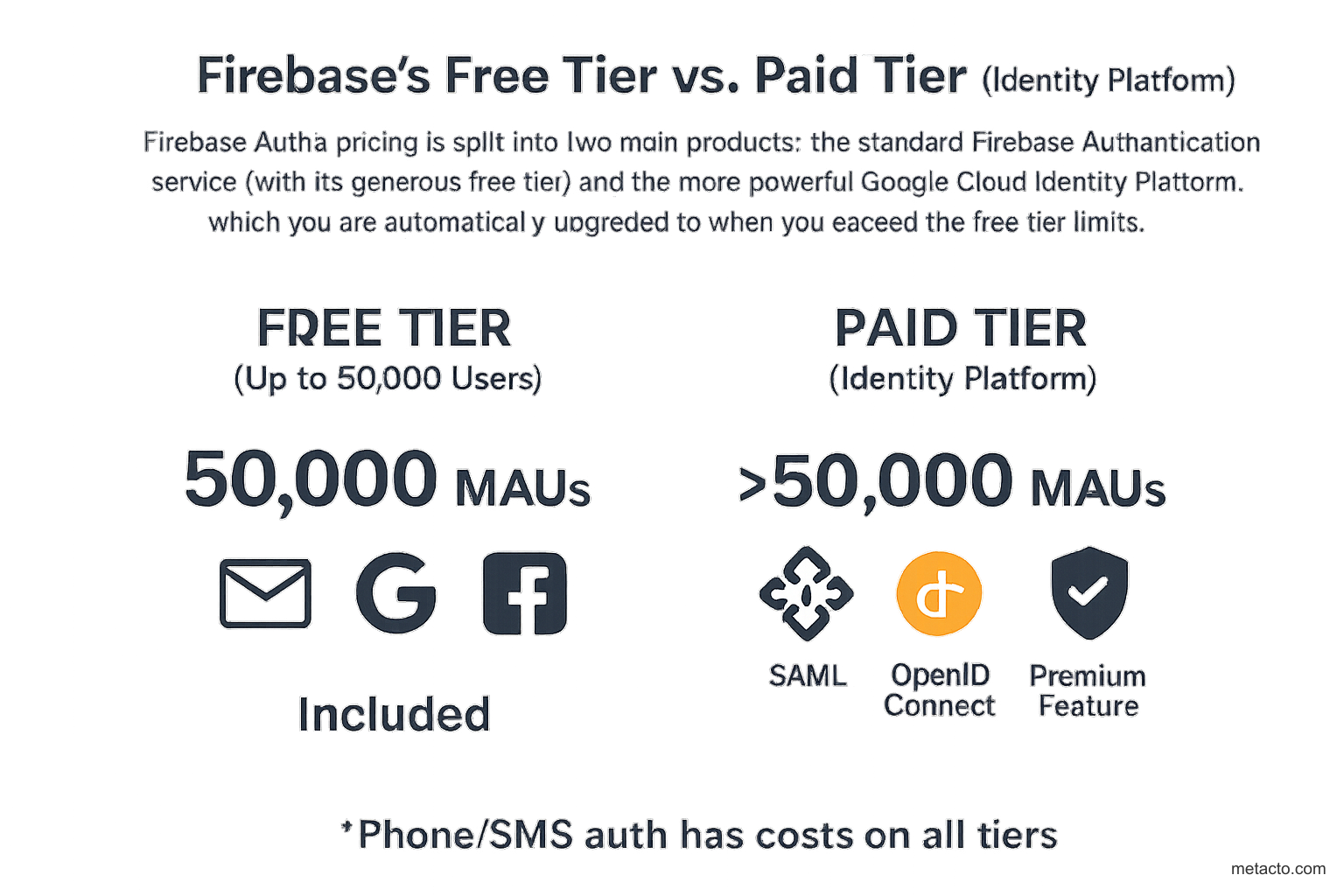
Free Tier vs Paid Tier Comparison Infographic
Designer Instructions
Create a visual breakdown of what's included in the free tier vs. what requires payment (upgrading to Identity Platform). Two-column layout: 'FREE TIER (Up to 50,000 Users)' and 'PAID TIER (Identity Platform)'. Left: Large '50,000 MAUs' text, icons for Email/Google/Facebook/Apple with 'Included' text. Right: '>50,000 MAUs' text, icons for SAML/OpenID Connect/MFA with 'Premium Feature' text. Small section at bottom: *Phone/SMS auth has costs on all tiers.
Here’s a clear, detailed comparison of what you get with each.
| Feature | Firebase Auth (Free Tier) | Identity Platform (Paid Tier) |
|---|---|---|
| Monthly Active Users (MAUs) | Up to 50,000 | First 50,000 are free, then tiered pricing |
| Standard Auth Providers | Email/Password, Google, Apple, Facebook, Twitter, GitHub | ✅ Included |
| Anonymous Auth | ✅ Included | ✅ Included |
| Phone Auth (SMS) | Paid per verification | Paid per verification (same rates) |
| Advanced Auth Providers | ❌ Not Available | ✅ SAML, OpenID Connect (OIDC) |
| Multi-Factor Auth (MFA) | ❌ Not Available | ✅ Included |
| Service Level Agreement (SLA) | ❌ Not Available | ✅ 99.95% Uptime |
| Custom Email Templates | ✅ Basic Customization | ✅ Advanced Customization via own SMTP server |
| Blocking Functions | ✅ Included | ✅ Included |
What are the Limits of the Firebase Auth Free Tier?
The free tier is designed for small to medium-sized apps and includes:
- Up to 50,000 Monthly Active Users (MAUs).
- Authentication Methods: Email & Password, Google, Facebook, Twitter, GitHub, Apple, Microsoft, and Yahoo sign-ins.
- Other Features: Secure account management, password reset flows, and basic email verification customization.
You will only be forced to upgrade to the paid Identity Platform tier if your app grows beyond 50,000 MAUs in a month.
How Are Monthly Active Users (MAUs) Calculated?
A “Monthly Active User” is one of the most important concepts in Firebase pricing.
Definition: An MAU is any user account that signs in or is created within a calendar month.
- First-time sign-in: When a user signs in for the first time during a month, they are counted as one MAU.
- Subsequent sign-ins: That same user can sign in a thousand more times during that same month, and they will still only count as one MAU.
- New Month, New Count: The counter resets on the first of every month.
This means you are not charged per sign-in, but per unique user that authenticates each month.
Firebase Phone Authentication Pricing (SMS & OTP Costs)
Phone Authentication (verifying a user’s phone number via an SMS code) is the one feature that is NOT free, even within the 50,000 MAU free tier. This is often where costs can surprise developers.
SMS Cost Breakdown by Country
You are charged per verification sent, and the price varies significantly by country. Here’s a comprehensive breakdown:
| Region/Country | Cost per SMS Verification |
|---|---|
| United States, Canada, India | $0.01 |
| United Kingdom | $0.04 |
| Brazil | $0.05 |
| All Other Countries | $0.06 |
| Premium routes (some carriers) | Up to $0.34 |
Free Testing Allowance: Firebase provides the first 10 SMS verifications per day for free when using test phone numbers. This is designed for development and testing purposes only.
Understanding SMS Costs at Scale
Let’s look at real-world scenarios to understand how SMS costs accumulate:
- 10,000 users with 30% using SMS (US): 3,000 SMS × $0.01 = $30/month
- 50,000 users with 20% using SMS (Global mix): ~10,000 SMS × $0.05 avg = $500/month
- 100,000 users with 40% using SMS (UK): 40,000 SMS × $0.04 = $1,600/month
Important: These costs can add up quickly, especially with global user bases. If you plan to heavily use phone authentication, be sure to budget accordingly. You must have a billing account enabled on your Google Cloud project to use this feature.
Hidden SMS Costs to Watch For
- Re-authentication: Users who log in multiple times per month via SMS increase costs
- Failed deliveries: You’re still charged for failed SMS attempts
- Premium carriers: Some mobile carriers charge premium rates (up to $0.34/SMS)
- International routing: SMS costs vary by destination country and carrier
- Verification retries: Users requesting multiple codes multiply costs
What Happens When You Exceed 50,000 MAUs?
This is the most critical pricing question. Once your 50,001st user signs in during a month, your project is automatically upgraded to the Google Cloud Identity Platform paid plan. You don’t lose access, but you start paying.
Identity Platform Pricing Tiers (May 2026)
The pricing uses a graduated tier system, with costs decreasing as you scale:
| Monthly Active Users (MAUs) | Price per MAU | Cost for Tier |
|---|---|---|
| 0 - 50,000 | Free | $0 |
| 50,001 - 100,000 | $0.0055 | Up to $275 |
| 100,001 - 1,000,000 | $0.0046 | Up to $4,140 |
| 1,000,001 - 10,000,000 | $0.0032 | Up to $28,800 |
| 10,000,001+ | $0.0025 | $0.0025 per additional MAU |
Real-World Cost Examples (Updated May 2026)
Let’s break down what you’ll actually pay at different scales using the current tiered pricing:
Example 1: Growing Startup (70,000 MAUs)
- First 50,000 MAUs: Free
- Next 20,000 MAUs (50,001-70,000): 20,000 × $0.0055 = $110
- Total: $110/month
Example 2: Mid-Size App (250,000 MAUs)
- First 50,000 MAUs: Free
- Next 50,000 MAUs (50,001-100,000): 50,000 × $0.0055 = $275
- Next 150,000 MAUs (100,001-250,000): 150,000 × $0.0046 = $690
- Total: $965/month
Example 3: Large App (1,500,000 MAUs)
- First 50,000 MAUs: Free
- Next 50,000 MAUs (50,001-100,000): 50,000 × $0.0055 = $275
- Next 900,000 MAUs (100,001-1,000,000): 900,000 × $0.0046 = $4,140
- Next 500,000 MAUs (1,000,001-1,500,000): 500,000 × $0.0032 = $1,600
- Total: $6,015/month
Example 4: Enterprise Scale (15,000,000 MAUs)
- First 50,000 MAUs: Free
- 50,001-100,000: 50,000 × $0.0055 = $275
- 100,001-1,000,000: 900,000 × $0.0046 = $4,140
- 1,000,001-10,000,000: 9,000,000 × $0.0032 = $28,800
- 10,000,001-15,000,000: 5,000,000 × $0.0025 = $12,500
- Total: $45,715/month
What You Get with Identity Platform
When you’re automatically upgraded (or manually upgrade), you gain access to:
- All standard authentication features (no interruption)
- SAML 2.0 and OpenID Connect (OIDC) for enterprise SSO (first 50 MAUs free, then $0.015/MAU)
- Multi-Factor Authentication (MFA) - TOTP-based MFA included; SMS-based MFA charged per message
- 99.95% SLA for uptime guarantees
- Advanced blocking functions and user management
- Custom SMTP server for email customization
When building authentication into your application, security should be a top priority. For applications leveraging AI capabilities, see our guide on AI Agent Security: Protecting Your Data to understand how authentication integrates with modern AI-powered systems.
The Migration Process
Good news: The transition is automatic and seamless.
- Your app continues working without any code changes
- You’ll receive a notification in your Google Cloud Console
- Billing begins immediately for MAUs over 50,000
- All existing users and configurations remain intact
- You can monitor usage in the Identity Platform dashboard
Pro Tip: Monitor your MAU count closely as you approach 50,000. Consider implementing usage alerts in Google Cloud Console to avoid surprise bills.
How to Reduce Firebase Authentication Costs
Based on our experience helping companies optimize their Firebase spending, here are proven strategies to reduce your authentication costs by up to 50%:
1. Implement Smart Session Management
Cost Impact: 20-40% reduction
Instead of requiring users to authenticate every time they open your app, implement persistent sessions:
- Use Firebase Auth tokens with appropriate expiration times (up to 1 hour)
- Implement refresh tokens for long-lived sessions
- Cache authentication state locally
- Only re-authenticate when absolutely necessary
Example: If users typically open your app 10 times/day, reducing re-authentication from every session to once per day saves 90% of SMS costs.
2. Prioritize Email/Social Auth Over SMS
Cost Impact: 100% reduction for converted users
SMS authentication is the only paid feature. Encourage users to use free alternatives:
- Offer email/password as the primary option
- Provide one-click social logins (Google, Apple, Facebook)
- Only use SMS as a backup or for specific use cases
- Add incentives for users who choose email authentication
Example: Converting 50% of SMS users to email auth at 100K MAUs saves approximately $2,000-$3,000/month.
3. Implement reCAPTCHA to Prevent SMS Fraud
Cost Impact: 10-30% reduction
Bot attacks and automated SMS abuse can drain your budget quickly:
- Add reCAPTCHA v3 to phone auth flows
- Implement rate limiting on SMS requests
- Monitor for suspicious patterns (same IP requesting multiple codes)
- Block temporary/disposable phone numbers
Real case: One client reduced SMS costs by 25% after implementing reCAPTCHA, blocking fraudulent requests.
4. Use Email Link Authentication
Cost Impact: 100% reduction vs SMS
Firebase supports passwordless email authentication with magic links:
- Users receive a link via email instead of SMS
- More secure than SMS (no SIM swapping vulnerability)
- Completely free within the 50K MAU limit
- Better user experience for email-first users
5. Optimize SMS Delivery Timing
Cost Impact: 15-25% reduction
Reduce failed deliveries and unnecessary sends:
- Validate phone numbers before sending (use libphonenumber)
- Only send SMS during user’s active hours
- Implement exponential backoff for retries
- Don’t send new codes if one was recently sent
6. Regional Strategy for Global Apps
Cost Impact: 30-50% reduction
If you have a global user base, prioritize auth methods by region:
- Use email auth for expensive regions (UK: $0.04, others: $0.06)
- Use SMS auth more freely in cheap regions (US/India: $0.01)
- Display cost-appropriate options based on user location
- Consider WhatsApp Business API as alternative in high-cost regions
7. Batch Operations and Monitoring
Cost Impact: Prevents budget overruns
Set up proper monitoring and controls:
- Create billing alerts in Google Cloud Console
- Set up budget caps to prevent runaway costs
- Monitor MAU growth trends monthly
- Use Cloud Functions to trigger alerts at thresholds
For a deeper dive into monitoring authentication systems and other critical infrastructure, see our guide on AI Monitoring: What to Track. Understanding what metrics matter helps you catch cost anomalies before they become budget emergencies.
Cost Optimization Checklist
Use this checklist to audit your Firebase Auth implementation:
- Session tokens configured with optimal expiration (30-60 minutes)
- Email/social auth offered as primary options
- reCAPTCHA implemented on phone auth flows
- Rate limiting active on SMS endpoints
- Phone number validation before SMS send
- Regional auth preferences configured
- Billing alerts set at 80% and 95% of budget
- Monthly cost review process established
- Failed SMS delivery monitoring active
- User education about free auth options
Firebase Authentication Alternatives: Detailed Comparison
While Firebase Auth is a market leader, it’s not the only option. Here’s a comprehensive breakdown of the top alternatives and how they compare on pricing, features, and value.
Quick Comparison Table (May 2026)
| Provider | Free Tier MAUs | Cost at 50K MAUs | Cost at 100K MAUs | Best For |
|---|---|---|---|---|
| Firebase Auth | 50,000 | $0 | $275 | Startups, Google ecosystem apps |
| Auth0 | 7,500 | ~$1,200/mo* | ~$2,400/mo* | Enterprise apps with complex needs |
| Clerk | 10,000 | ~$600/mo | ~$1,200/mo | Modern SaaS, developer experience |
| Supabase Auth | Unlimited** | $0** | $0** | Cost-conscious, Postgres users |
| AWS Cognito | 50,000 | $0 | $275 | AWS ecosystem apps |
*Auth0 doesn’t publish pricing above free tier; estimates based on reported costs **Free with self-hosting; paid plans start at $25/mo for managed hosting
When evaluating authentication providers, consider how they’ll integrate with your existing systems. Our guide on API-First AI: Integration Architecture covers best practices for building extensible authentication layers.
Detailed Provider Breakdown
Firebase Auth
Pros:
- Most generous free tier (50,000 MAUs)
- Simple pricing model
- Excellent documentation
- Seamless Google Cloud integration
- Fast implementation
Cons:
- SMS costs add up quickly
- Limited to Google ecosystem
- Less flexibility for custom flows
- Enterprise features require Identity Platform upgrade
Best for: Startups, mobile apps, projects already using Firebase/Google Cloud
Pricing Summary: Free up to 50K MAUs, then tiered: $0.0055/MAU (50K-100K), $0.0046/MAU (100K-1M), $0.0032/MAU (1M-10M), $0.0025/MAU (10M+)
Auth0
Pros:
- Most mature enterprise features
- Extensive customization options
- Strong security and compliance
- 30+ social providers
- Advanced rules and actions
Cons:
- Expensive at scale
- Complex pricing structure
- Limited free tier (7,500 MAUs)
- Pricing increases with scale (unusual)
- Can be overkill for simple apps
Best for: Enterprise applications, complex authentication requirements, companies with security/compliance needs
Pricing Summary: Free up to 7,500 MAUs, then custom pricing (reportedly $800-2,000/mo for 50K MAUs)
Clerk
Pros:
- Beautiful pre-built UI components
- Excellent developer experience
- Modern, React-friendly
- Good free tier (10,000 MAUs)
- Unique MAU counting (only after 24 hours)
Cons:
- Expensive after free tier
- Younger product (less proven at scale)
- Primarily focused on web apps
- Limited enterprise features
Best for: Modern SaaS applications, React/Next.js projects, developers who value UX
Pricing Summary: Free up to 10K MAUs, then $25/mo + $0.02/MAU for additional users
Supabase Auth
Pros:
- Truly open-source (can self-host)
- Free unlimited users with self-hosting
- Built on Postgres (familiar, powerful)
- Includes database, storage, edge functions
- No vendor lock-in
Cons:
- Self-hosting requires infrastructure knowledge
- Managed pricing can add up
- Smaller community than Firebase/Auth0
- Mobile SDKs less mature
- More DIY approach needed
Best for: Cost-conscious startups, Postgres users, developers comfortable with infrastructure, projects wanting no vendor lock-in
Pricing Summary: Free self-hosted; managed starts at $25/mo (unlimited auth users)
AWS Cognito
Pros:
- Same free tier as Firebase (50K MAUs)
- Deep AWS integration
- Enterprise-grade security
- Highly scalable
- Fine-grained access control
Cons:
- Complex setup and configuration
- Steeper learning curve
- Less developer-friendly
- SMS costs separate (AWS SNS)
- Documentation can be confusing
Best for: AWS-heavy applications, enterprise projects, teams already using AWS
Pricing Summary: Free up to 50K MAUs, then $0.0055/MAU for next 50K, decreasing with scale
When to Choose Each Provider
Choose Firebase Auth if:
- You’re building an MVP or startup
- You want the simplest implementation
- You’re already using Google Cloud or Firebase
- You need to get to market fast
- You have under 50K users
Choose Auth0 if:
- You’re an enterprise with complex auth needs
- You need extensive customization
- Security/compliance is critical
- Budget is less of a concern
- You need advanced features like SAML, MFA, adaptive auth
Choose Clerk if:
- You’re building a modern SaaS product
- Developer experience matters a lot
- You want beautiful pre-built UI
- You’re using React/Next.js
- You value speed to market with great UX
Choose Supabase Auth if:
- Cost is a primary concern
- You want to avoid vendor lock-in
- You’re comfortable with infrastructure
- You’re already using Postgres
- You want an all-in-one backend solution
Choose AWS Cognito if:
- You’re heavily invested in AWS
- You need enterprise scalability
- Your team knows AWS well
- You want deep AWS service integration
Migration Considerations
If you’re considering switching from Firebase Auth:
- Data Export: Firebase allows user export via Admin SDK
- Password Hashes: Can be migrated to Auth0, Supabase (with work)
- Social Logins: Must be reconfigured with new OAuth apps
- Downtime: Plan for minimal auth downtime during migration
- Cost: One-time migration cost vs. long-term savings
- Integration Debt: Understand the hidden costs of rushed migrations—see The Integration Debt Problem
At metacto, we’ve helped dozens of companies migrate between auth providers. Our Fractional CTO services include unbiased guidance on choosing and implementing the right authentication platform for your specific situation, technical requirements, and budget.
When to Seek Expert Help
While Firebase Authentication is designed to be straightforward, implementing a secure, scalable, and user-friendly authentication system can still be complex. If you’re managing a large user base, migrating from another system, or need to integrate enterprise features like SAML or OIDC, partnering with an expert can save you time and prevent costly mistakes.
At metacto, we specialize in building robust applications using cutting-edge technologies like Firebase. Our services, from rapid MVP development to full-scale mobile app development, cover everything from initial architecture to long-term maintenance, ensuring your app’s foundation is secure and built to scale.
Frequently Asked Questions (FAQ)
What is Firebase OTP pricing?
Firebase OTP (One-Time Password) pricing is the same as SMS/phone authentication pricing. You pay per SMS sent: $0.01 for US/Canada/India, $0.04 for UK, $0.05 for Brazil, and $0.06 for most other countries. Some premium carriers can charge up to $0.34 per SMS. The first 10 SMS per day are free for testing with test phone numbers only.
What is the difference between Firebase Authentication and Identity Platform?
Firebase Authentication is the developer-facing product name with the generous free tier. Google Cloud Identity Platform is the underlying enterprise-grade service that powers it. When you exceed 50,000 MAUs, you're automatically upgraded to Identity Platform's paid tier. You get the same core functionality plus advanced features like SAML, OIDC, MFA, and a 99.95% SLA.
Is Firebase Authentication free?
Yes, Firebase Authentication is completely free for up to 50,000 Monthly Active Users (MAUs) when using email/password, Google, Facebook, Apple, and other social sign-ins. However, Phone/SMS authentication costs money from the first use ($0.01-$0.06 per SMS depending on country). Once you exceed 50,000 MAUs, you pay tiered rates: $0.0055/MAU (50K-100K), $0.0046/MAU (100K-1M), $0.0032/MAU (1M-10M), and $0.0025/MAU (10M+).
Is there a free tier for Phone Authentication?
No. Phone (SMS) authentication is the only Firebase Auth feature that costs money from the very first use in production. Google pays telecommunication carriers to send text messages, and that cost is passed on to you. You get 10 free SMS verifications per day for testing purposes with test phone numbers, but production SMS are always charged.
How can I reduce Firebase Authentication costs?
There are seven proven strategies: 1) Implement smart session management to reduce re-authentication frequency (20-40% savings). 2) Prioritize email/social auth over SMS (100% cost reduction for converted users). 3) Add reCAPTCHA to prevent SMS fraud (10-30% savings). 4) Use email link authentication instead of SMS. 5) Optimize SMS delivery timing and validation. 6) Use regional strategies for global apps. 7) Set up proper monitoring and billing alerts.
How can I estimate my monthly Firebase Auth costs?
Use our cost calculator above, or calculate manually: 1) Count your expected Monthly Active Users (MAUs). If under 50,000, MAU cost is $0. If over 50K, apply tiered pricing: $0.0055/MAU for 50K-100K, $0.0046/MAU for 100K-1M, $0.0032/MAU for 1M-10M, $0.0025/MAU for 10M+. 2) Estimate SMS usage: (Total MAUs) × (% using phone auth) × (SMS cost for your region). 3) Add both together. Example: 75K MAUs with 20% SMS users in US = (25K × $0.0055) + (15K × $0.01) = $137.50 + $150 = $287.50/month.
What happens when you exceed 50,000 MAUs?
Your project is automatically upgraded to Google Cloud Identity Platform. There's no downtime or code changes required. You start paying tiered rates: $0.0055/MAU for 50K-100K users, $0.0046/MAU for 100K-1M, $0.0032/MAU for 1M-10M, and $0.0025/MAU for 10M+. You also gain access to enterprise features like SAML, OIDC, MFA, and a 99.95% uptime SLA.
Is Firebase expensive compared to alternatives?
Firebase Auth is one of the most cost-effective options, especially for startups and mid-size apps. It has the most generous free tier (50,000 MAUs) compared to Auth0 (7,500 MAUs) or Clerk (10,000 MAUs). At 100K MAUs, Firebase costs ~$275/month vs Auth0's ~$2,400/month or Clerk's ~$1,200/month. However, AWS Cognito and self-hosted Supabase can be cheaper at very large scale.
Does Firebase Auth offer all features in lower pricing tiers?
Most standard features are available in the free tier: email/password, social logins (Google, Facebook, Apple, etc.), anonymous auth, custom email templates, and blocking functions. However, advanced features require the paid Identity Platform tier: SAML, OpenID Connect (OIDC), Multi-Factor Authentication (MFA), and SLA guarantees. Phone/SMS authentication is available at all tiers but costs money per SMS.
What are the best free alternatives to Firebase Authentication?
The best alternatives depend on your needs: **Supabase Auth** is ideal if you want open-source and can self-host (unlimited free users). **AWS Cognito** matches Firebase's 50K free MAU tier if you're in the AWS ecosystem. **Clerk** offers 10K free MAUs with beautiful pre-built UI components. **Auth0** has only 7,500 free MAUs but offers the most enterprise features. For pure cost optimization, self-hosted Supabase is unbeatable.
How does Firebase Auth pricing compare to other authentication providers?
Firebase offers the best value for most use cases. At 50K MAUs: Firebase ($0), Cognito ($0), Clerk (~$800), Auth0 (~$1,200). At 100K MAUs: Firebase ($275), Cognito ($275), Clerk (~$1,200), Auth0 (~$2,400). Firebase's main cost advantage is the 50K free tier and predictable tiered pricing. However, SMS costs are similar across all providers, and self-hosted options like Supabase can be cheaper at scale.
What is Firebase SMS pricing in India?
Firebase SMS authentication costs $0.01 per verification in India, which is the lowest rate tier (same as United States and Canada). This makes phone authentication very affordable for Indian user bases. For example, 10,000 SMS verifications would cost only $100/month in India, compared to $400 in the UK or $600 in most other countries.
Conclusion: Make Smart Authentication Decisions
Firebase Authentication offers one of the most generous free tiers in the industry—50,000 MAUs at $0—making it an excellent choice for startups and growing applications. However, costs can escalate quickly with SMS authentication and scale, especially if you’re not implementing cost optimization strategies.
Key Takeaways
- Free tier is generous: 50,000 MAUs with all standard auth methods (email, social logins)
- SMS costs add up: $0.01-$0.06 per message by region—can easily reach $500-2,000/month
- Scaling is predictable: Tiered pricing from $0.0055/MAU (50K-100K) down to $0.0025/MAU (10M+)
- Cost optimization works: Implement our 7 strategies to reduce costs by up to 50%
- Alternatives exist: Compare Auth0, Clerk, Supabase, and Cognito for your specific needs
How metacto Can Help
At metacto, we’ve helped dozens of companies optimize their Firebase costs, migrate between auth providers, and implement secure, scalable authentication systems. Our expertise includes:
- 🔐 Firebase Auth implementation optimized for cost and performance
- 📊 Cost analysis and optimization for existing Firebase implementations
- 🚀 Authentication architecture design for startups and scale-ups
- 🔄 Migration services between auth providers (Firebase, Auth0, Clerk, etc.)
- 👨💼 Fractional CTO guidance on technical and business decisions
We’ve helped clients reduce their Firebase Auth costs by an average of 35-50% through smart implementation strategies, regional optimization, and alternative authentication methods.
Ready to Optimize Your Authentication?
Whether you’re building a new application or optimizing an existing one, getting your authentication strategy right from the start saves time, money, and headaches down the road.
Schedule a free consultation with our team to discuss:
- Your specific authentication requirements
- Cost optimization opportunities for your app
- Whether Firebase Auth is the right choice for your use case
- Implementation best practices and security considerations
Related Services:
- Mobile App Development - Build iOS and Android apps with optimized Firebase integration
- Fractional CTO Services - Get strategic technical guidance on architecture decisions
- Rapid MVP Development - Launch your product fast with the right auth foundation
- AI Development - Integrate AI features with secure, scalable authentication
Explore More Cost Guides:
- The True Cost of Supabase: Pricing & Integration Guide
- RevenueCat Guide: Simplifying In-App Subscriptions
- Anthropic API Pricing: Full Cost Breakdown
Related Reading
As you implement and optimize your Firebase Authentication setup, these guides provide deeper context on related topics:
Security and Compliance:
- AI Agent Security: Protecting Your Data — Essential security considerations when authentication integrates with AI-powered systems
- Compliance-Ready AI Workflows — Governance frameworks that work alongside authentication for regulated industries
Integration Architecture:
- API-First AI: Integration Architecture — Building extensible systems where authentication is one layer of a well-architected stack
- AI Data Integration: CRM, Email, Docs, Slack — How authentication credentials flow through multi-system integrations
- The Integration Debt Problem — Why authentication shortcuts create long-term technical debt
Operations and Monitoring:
- Continuous AI Operations — Keeping authentication and other critical systems running at scale
- AI Monitoring: What to Track — Metrics that matter for authentication performance and cost management
Let’s build your application the right way—secure, scalable, and cost-effective. Get in touch today.